NBS 7 architecture
This page explains how the NBS 7 components fit together and how data flows between them. Understanding this architecture helps you plan your deployment and interpret the steps in the deployment guide. For cloud-provider and tooling details, see Cloud prerequisites for AWS and Azure.
On this page
- How NBS 7 relates to NBS 6
- Architecture diagram
- The request path
- The reporting path
- Components
- How NBS 7 is deployed
How NBS 7 relates to NBS 6
NBS 7 does not replace NBS 6 all at once. It runs alongside your existing NBS 6 system and takes over functionality incrementally, an approach known as the strangler fig pattern. Users move between modern NBS 7 features and classic NBS 6 features during the transition. As the modern system gains functionality, they rely on it for more of their work.
NBS 7 uses the same underlying NBS 6 databases rather than migrating the data to a new store. As a result, NBS 7 requires network access to the NBS 6 application and database server. In a typical deployment, NBS 7 runs in its own virtual network, peered with the network that hosts NBS 6 to provide this access. Establishing this connectivity is part of your chosen network configuration.
Architecture diagram
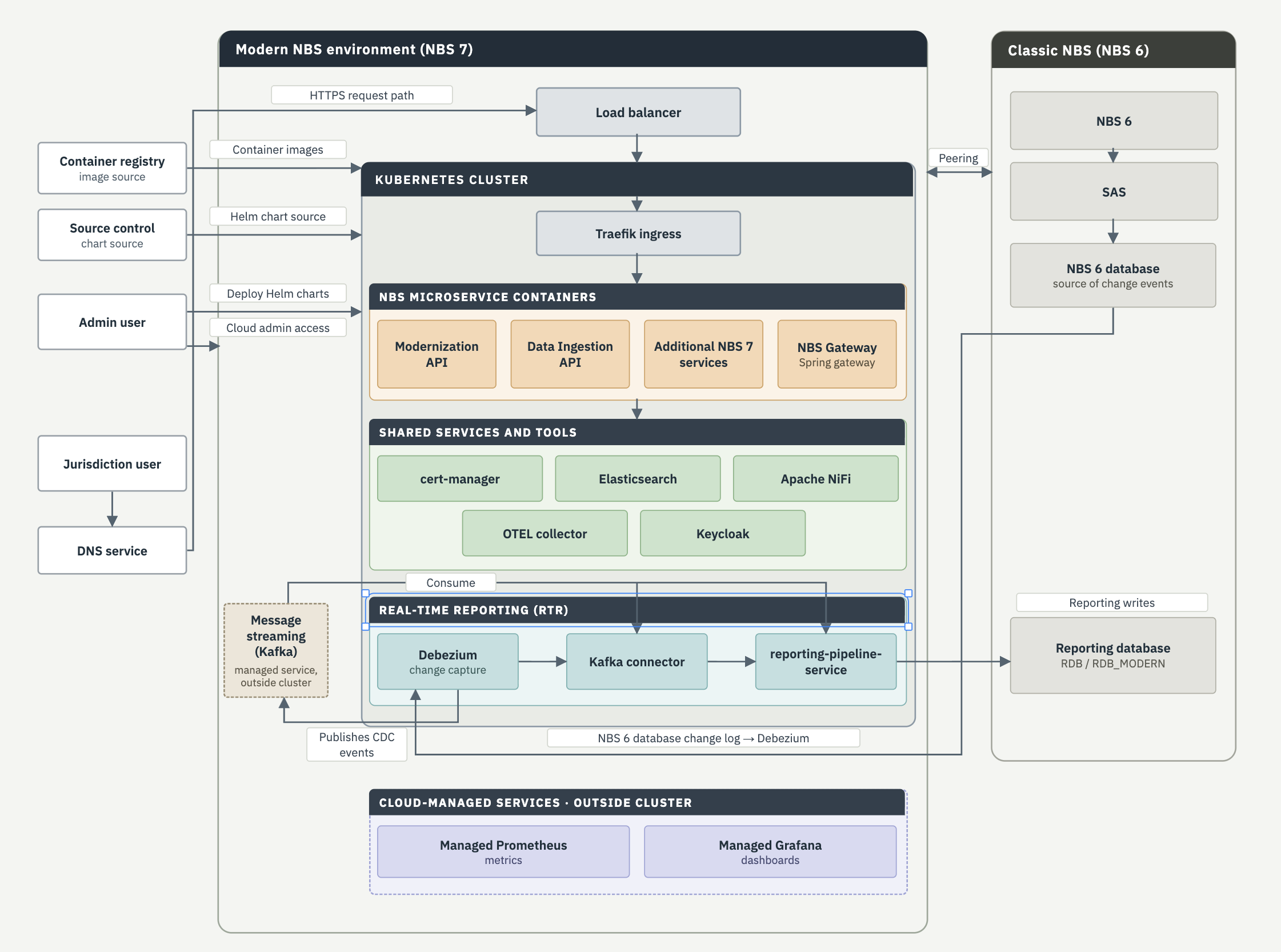
The following diagram shows the NBS 7 components, the request path that serves users, and the reporting path that streams data changes to the reporting database. Cloud-specific service names, such as the load balancer and managed services, are described generically here. See Provision cloud infrastructure for the AWS and Azure implementation of each.
The request path
When a user opens NBS 7, their request follows this path:
- The user’s browser resolves the NBS 7 address through your DNS service.
- DNS directs the request to the load balancer, the entry point into the virtual network.
- The load balancer forwards the request to the Traefik ingress controller inside the Kubernetes cluster.
- Traefik routes the request to the correct service based on the address. The NBS Gateway applies the strangler routing rules that decide whether a request is served by NBS 7 or passed through to NBS 6.
The reporting path
Real-time reporting (RTR) streams changes from the NBS databases to a reporting database in near real time, which reduces reporting latency from as long as 24 hours to between 5 minutes and 1 hour. The data flows through these stages:
- Debezium monitors the change log of the
NBS_ODSEandNBS_SRTEdatabases and captures row-level changes. - Debezium publishes those changes as events to Kafka topics. Kafka runs as a managed message-streaming service outside the Kubernetes cluster.
- The Kafka connector and the reporting-pipeline-service consume the events from Kafka.
- The reporting-pipeline-service transforms the events and writes them to the reporting database (
RDBorRDB_MODERN).
During the transition, RTR runs alongside the legacy MasterETL batch process rather than replacing it, so you can compare results before relying on RTR. For deployment steps, see Deploy real-time reporting.
Components
NBS 7 groups its components into tiers by role. The following sections describe each tier shown in the architecture diagram: the microservices that provide NBS 7 features, the shared services that support them, the real-time reporting services, and the cloud-managed services for observability.
NBS microservice containers
These services provide the modernized NBS 7 features:
- Modernization API: Provides core NBS 7 features such as patient search, event search, patient profiles, and investigations.
- Data Ingestion API (DI API): Accepts electronic lab reports and other electronic data, validates it, and routes it into NBS.
- NBS Gateway: Applies the strangler routing rules between NBS 7 and NBS 6, using Spring Cloud Gateway.
- Additional NBS 7 services: Supporting services deployed as the modernized system grows.
Shared services and tools
These services support the NBS 7 microservices:
- cert-manager: Automates TLS certificate management, using Let’s Encrypt as the default certificate authority.
- Elasticsearch: Provides fast search across NBS data.
- Apache NiFi: Populates Elasticsearch indices from the NBS database.
- OTEL collector: Collects logs and metrics from the microservices and Kubernetes components.
- Keycloak: Provides authentication, token management, and single sign-on (SSO) integration with external identity providers such as Okta, using OpenID Connect (OIDC).
Real-time reporting
These services make up the reporting path described in the reporting path:
- Debezium: Captures row-level changes from the
NBS_ODSEandNBS_SRTEdatabases and publishes them to Kafka. - Kafka connector: Consumes reporting events from Kafka topics.
- reporting-pipeline-service: Transforms the events and writes them to the reporting database.
Cloud-managed services
NBS 7 uses managed services from your cloud provider for observability, provisioned by Terraform:
- Managed Prometheus: Collects infrastructure and application metrics.
- Managed Grafana: Visualizes those metrics in dashboards.
How NBS 7 is deployed
NBS 7 uses an infrastructure as code approach, so the environment is defined in version-controlled files rather than configured by hand:
- Terraform provisions the cloud environment: the virtual network, the Kubernetes cluster, storage, the managed services, and the message-streaming service.
- Helm deploys and configures the workloads that run inside the Kubernetes cluster.
- Both are distributed from GitHub.
For the full deployment procedure, see Deploy NBS 7.13.