Deploy Real Time Ingestion (RTI) data processing for NBS 7
This page walks through deploying the Real Time Ingestion (RTI) data processing service using the data-processing-service Helm chart from the NEDSS-Helm repository for NBS version 7.13.
On this page
Overview
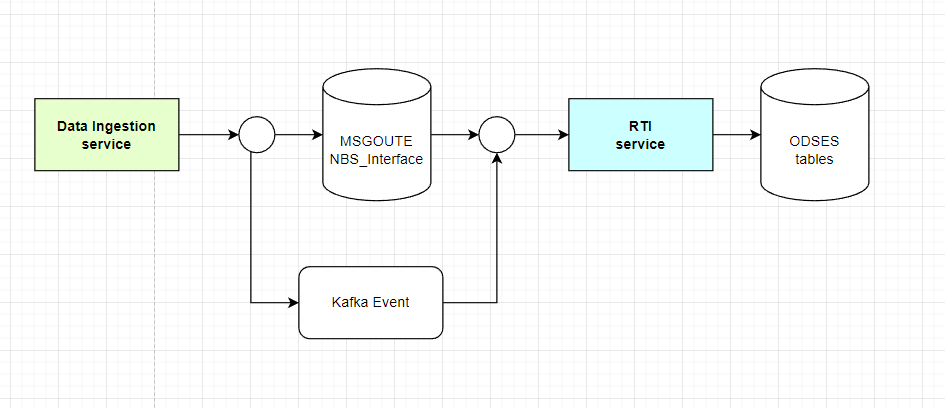
Real Time Ingestion (RTI) is a microservice that picks up ELR data after it has been ingested and queued in the NBS Interface table. It processes each record and either marks it as successful or delivers it to the NBS queue. Events are handled through Kafka. There is no direct user interaction with RTI. RTI is triggered through the data ingestion ELR endpoint and can work alongside the ELR importer batch job or replace it, providing near-real-time ELR processing without requiring a STLT-managed batch job.
Prerequisites
This page assumes you’ve completed Before you begin for the microservices phase and each microservice deployment page before this one, in order. The page immediately before this one is the NBS Gateway deployment.
Have your database credentials, Kafka endpoints, and Keycloak client secret available. See the Helm values reference and Import service clients and retrieve secrets if you need help determining any values.
Deploy RTI using Helm
Complete the following steps to deploy the ‘data-processing-service’ Helm chart from the charts/data-processing-service/ directory of your cloned NEDSS-Helm repository:
- Confirm that a DNS entry for the data ingestion endpoint was created and points to the active Network Load Balancer (NLB) provisioned during core services deployment.
-
Set the auth user. RTI uses a valid NBS user to process data. Set
nbs.authuserto a valid user fromODSE.Auth_User:nbs: authuser: "superuser"To find valid auth users, query the ODSE database. Replace
NBS_ODSEif your database uses a different name:SELECT * FROM NBS_ODSE.dbo.Auth_user; -
In the
data-processing-service/values.yamlfile, search forEXAMPLEand fill in your environment-specific values for the JDBC connection, data ingestion ingress domain, Kafka cluster endpoint, and SRTE Keycloak client. Thedbservervalue is the database server endpoint only; do not include the port number. The Helm values reference lists the values to use.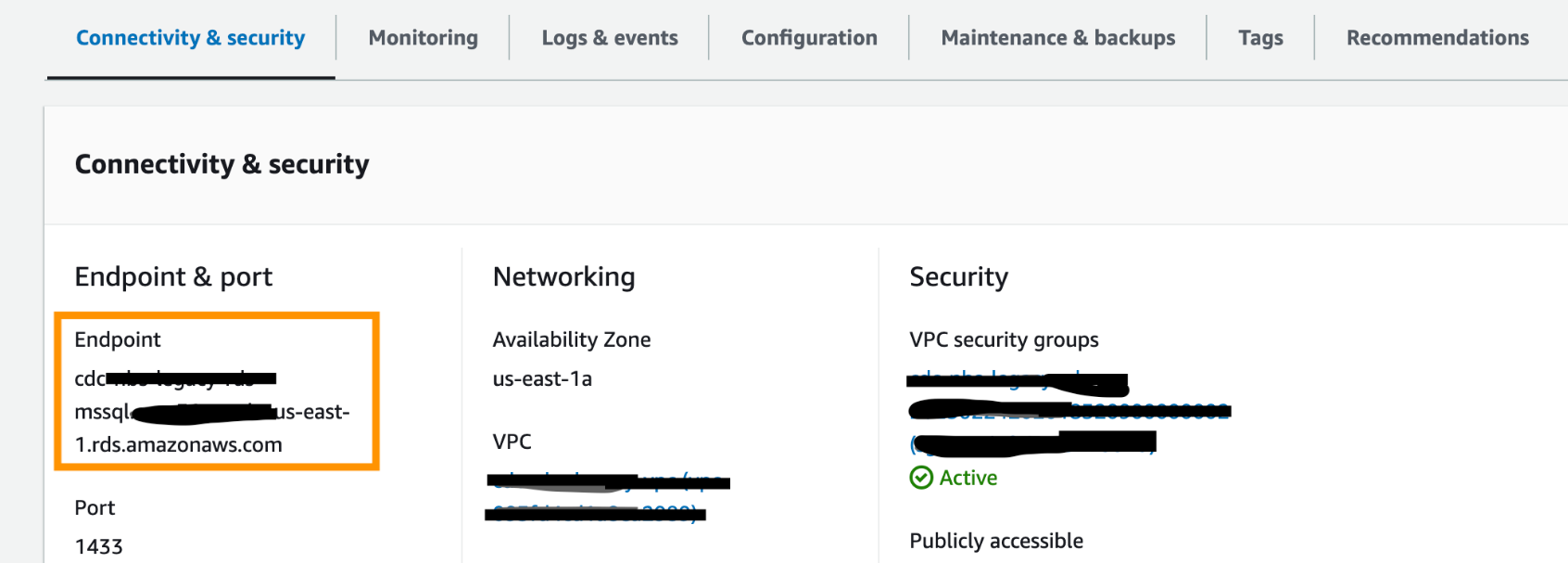
-
Install the data processing service:
helm install "data-processing-service" ./data-processing-service -f ./data-processing-service/values.yaml -
Confirm the pod is running before continuing:
kubectl get pods - See RTI API testing and integration for API testing guidance.
-
Validate the service by running the following commands and verifying that the output is similar to what is shown. These commands require the jq JSON processor to be installed.
-
Run the info endpoint to confirm the service version and build details:
curl --silent https://<data.EXAMPLE_DOMAIN>/rti/actuator/info | jqExpected output:
{ "build": { "artifact": "data-processing-service", "name": "data-processing-service", "time": "2026-03-24T15:47:15.920Z", "version": "7.13-SNAPSHOT", "group": "gov.cdc.dataprocessing" }, "java": { "version": "21.0.10", "vendor": { "name": "Amazon.com Inc.", "version": "Corretto-21.0.10.7.1" }, "runtime": { "name": "OpenJDK Runtime Environment", "version": "21.0.10+7-LTS" }, "jvm": { "name": "OpenJDK 64-Bit Server VM", "vendor": "Amazon.com Inc.", "version": "21.0.10+7-LTS" } } } -
Run the health endpoint to confirm the service is running:
curl --silent https://<data.EXAMPLE_DOMAIN>/rti/actuator/health | jqExpected output:
{
"status": "UP",
"groups": [
   "liveness",
   "readiness"
],
"components": {
   "db": {
      "status": "UP",
      "components": {
      "nbsDataSource": {
         "status": "UP",
         "details": {
            "database": "Microsoft SQL Server",
            "validationQuery": "isValid()"
         }
      },
      "odseDataSource": {
         "status": "UP",
         "details": {
            "database": "Microsoft SQL Server",
            "validationQuery": "isValid()"
         }
      },
      "srteDataSource": {
         "status": "UP",
         "details": {
            "database": "Microsoft SQL Server",
            "validationQuery": "isValid()"
         }
      }
      }
   },
   "diskSpace": {
      "status": "UP",
      "details": {
      "total": 42869960704,
      "free": 21168852992,
      "threshold": 10485760,
      "path": "/.",
      "exists": true
      }
   },
   "livenessState": {
      "status": "UP"
   },
   "ping": {
      "status": "UP"
   },
   "readinessState": {
      "status": "UP"
   },
   "ssl": {
      "status": "UP",
      "details": {
      "validChains": [],
      "invalidChains": []
      }
   }
}
}
-
Next steps
To validate Real Time Ingestion (RTI) by sending ELR data through the data ingestion endpoint, proceed to Test RTI API integration for Data Processing.